Defining KPIs in Document Control is essential. It allows us to be more proactive in our practice and to identify potential issues before they escalate. Ideally, performance indicators help us detect problems before they even happen. At the very least, they help us identify them early, while corrective actions are still possible.
Typical examples of Document Control KPIs include:
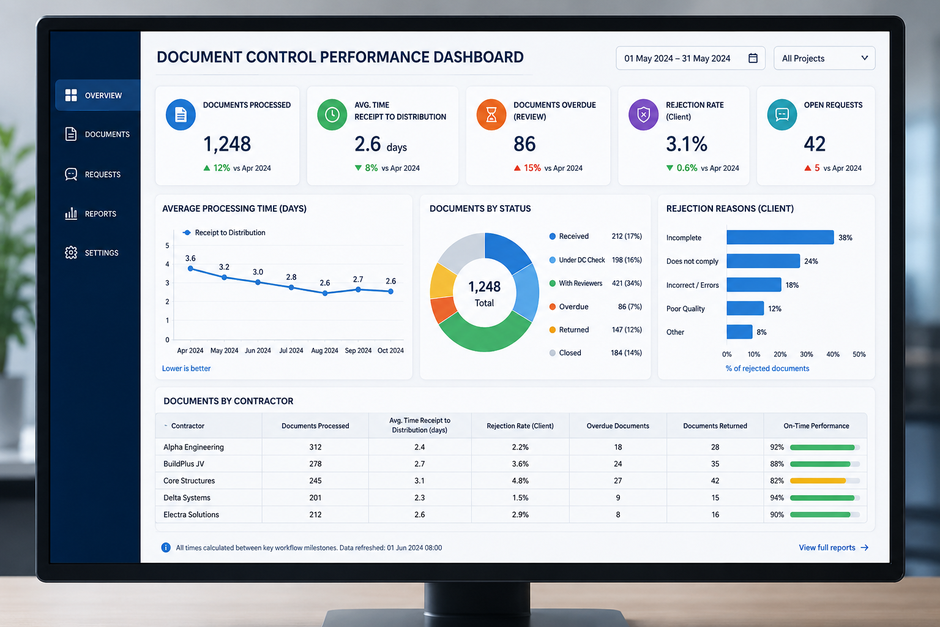
- How long does it take for Document Control to process a document between the moment it is received and the moment it is distributed?
- How many transmittals sent to the Client are rejected because of insufficient quality or inadequate control?
- How long does it take to respond to queries received from our interfaces?
- What percentage of documents must be rejected for each contractor or subcontractor?
- What are the most frequent request types?
- How many documents are pending review, overdue, or blocked at each stage of the workflow?
- Which disciplines, contractors, or document types generate the highest number of issues?
It is easy to see why this type of insight is valuable. Without it, Document Control can quickly become reactive.
The team handles incoming requests, distributes documents, sends reminders, updates registers and resolves urgent issues, but it may not have a clear view of where the pressure points really are.
With reliable indicators, the situation changes. We can see whether delays are increasing. We can identify whether one contractor regularly submits incomplete packages. We can demonstrate whether the Document Control team itself is meeting its response commitments. We can also distinguish between perceived problems and actual measurable trends.
The practical question
But once KPIs have been defined, the next question is practical: how do we get the data that allows us to track them?
For example, how do we know precisely the average time between receipt and distribution of a document? How do we measure the time required to answer a query? How do we know whether delays are caused by Document Control, by technical reviewers, by contractors, or by unclear workflows?
In this article, we will look at several practical methods that can be used in daily Document Control practice to collect the data needed for meaningful performance tracking.
1. Start with the Process, Not the Indicator
Before choosing tools or dashboards, it is important to understand the process we are trying to measure.
A KPI is only useful if it reflects a real activity, a real decision point or a real risk. If the workflow itself is unclear, the data will also be unclear. For example, if different Document Controllers interpret “received date” differently, the KPI based on receipt time will not be reliable.
Before tracking performance, the team should define key process milestones clearly. For example:
- Date received by Document Control
- Date checked by Document Control
- Date distributed for review
- Review due date
- Date comments received
- Date returned to contractor
- Date transmitted to Client
- Date accepted or rejected
These definitions must be consistent. A “distribution date” should not mean one thing in one register and something different in another system. If the same milestone is recorded differently by different people, the resulting KPI may look precise, but it will not be trustworthy.
In Document Control, the quality of the performance indicator depends first on the quality of the underlying metadata.
2. Use Registers with Embedded Time Stamps
One of the simplest ways to start tracking performance is to embed key time stamps directly into the document register.
This can be done in Excel, a document management system or any structured register. The principle is the same: each important step in the workflow should generate a recorded date and, ideally, a recorded user.
For example, the register may include fields such as:
- Date received
- Date checked
- Date distributed
- Date comments consolidated
- Date returned
- Date closed
Some of these dates may be entered manually. However, wherever possible, automated time stamps are preferable.
One option is to use a macro to add a timestamp in one click, every time you need it. This video shows you how:
Another option is to use automations to automate the timestamps: If a Document Controller changes the status from “Received” to “Under DC Check”, the system can automatically record the date and time of that change. If a status moves to “Distributed for Review”, another time stamp can be generated.
This reduces the risk of forgetting to update dates retrospectively. It also avoids the temptation to adjust dates manually to make the process look better than it was.
Once these time stamps exist, useful calculations become possible. For example:
- Time from receipt to distribution
- Time spent in Document Control check
- Time spent with reviewers
- Time from contractor submission to final return
- Number of overdue items by workflow stage
This is often the foundation of practical Document Control reporting.
3. Use Ticketing Systems for Requests and Queries
Not all Document Control activities are document submissions. A large part of the work also comes from requests, questions, clarifications and support tasks.
For these activities, a ticketing system can be particularly useful.
Typical Document Control requests may include:
- Requests for access to the document management system
- Questions about document numbering
- Requests for status updates
- Requests to correct metadata
- Requests to retrieve superseded documents
- Clarifications about workflows or transmittals
- Contractor or Client queries
If these requests are managed only through email, it becomes difficult to measure them properly. Some requests may be answered quickly, others may be forgotten in inboxes, and many may never be classified by type.
A ticketing system changes this. Each request can have:
- A creation date
- A request type
- A priority
- An owner
- A status
- A response date
- A closure date
This allows the team to track response time, resolution time, request volume, backlog and recurring issues.
For example, if “access request” tickets are increasing sharply, this may indicate an onboarding issue. If “metadata correction” tickets are frequent, this may point to poor training, unclear instructions or weak validation rules in the system. If many tickets remain open because they depend on another department, this can help demonstrate that the bottleneck is not necessarily within Document Control itself.
4. Automate Data Collection Where Possible
Manual tracking can work, but it has limits. It depends on discipline, consistency and memory. In a busy Document Control environment, these are not always guaranteed.
This is where no-code automation tools can be useful. Tools such as Power Automate, Zapier or Make can help connect systems and record workflow events automatically.
For example, an automation could:
- Add a time stamp when a document status changes
- Notify Document Control when a review is overdue
- Create a task when a new submission is received
- Log incoming requests from a shared mailbox into a tracker
- Update a dashboard when a document is returned
- Send a reminder when a document has been pending too long
- Capture the date when a transmittal is issued
The value of automation is not only efficiency. It also improves data reliability. If the system records the event at the moment it happens, the resulting dataset is usually stronger than one reconstructed manually at the end of the week.
However, automation must be designed carefully. Automating a weak process simply produces weak data faster. The workflow, statuses and fields must be clear before automation is introduced.
Where automation supports Document Control
Automation can play an important role in making Document Control performance data more reliable, especially when it comes to time stamps, status changes, reminders, and repetitive workflow actions.
Read more: Automation in Document Control: Do More with Less Time
5. Use Controlled Lists and Standard Categories
A common reason why performance reports fail is inconsistent categorisation.
For example, one person may record a request as “Access issue”, another as “Login problem”, another as “DMS access”, and another as “User account”. Individually, these labels may make sense. Collectively, they make reporting difficult.
To avoid this, key fields should use controlled lists wherever possible. These may include:
- Request type
- Document type
- Discipline
- Contractor
- Status
- Rejection reason
- Priority
- Workflow stage
- Return code
This allows the team to analyse data consistently. It also makes dashboards much more meaningful.
For example, a rejection rate by contractor is only useful if rejection reasons are recorded in a consistent way. Otherwise, the report may show many different categories that are really describing the same problem.
Good performance tracking requires standard vocabulary.
6. Connect the Data to Action
A dashboard that shows delays, rejection rates or request volumes is useful only if someone acts on the information.
If a KPI shows that documents from a particular contractor are frequently rejected, this should lead to a discussion, training session, clarification of requirements or contractual escalation.
If the data shows that internal reviews consistently exceed agreed deadlines, this should trigger a review of reviewer workload, approval routes or reminder processes.
The best Document Control indicators are not decorative. They support decision-making.
They help answer questions such as:
- Where are we losing time?
- Which interfaces require support?
- Which processes are unclear?
- Which contractors need corrective action?
- Are we resourced correctly?
- Are we meeting our commitments?
- Where should we focus improvement efforts?
This is where Document Control becomes more than administration. It becomes a source of operational intelligence.
Conclusion
Tracking the performance of Document Control is not simply about producing reports. It is about creating visibility over the way information moves through a project or organisation.
To do this properly, Document Control teams need more than a list of KPIs. They need clear processes, well-defined milestones, structured registers, reliable time stamps, controlled categories and practical tools for capturing requests and workflow events.
Ticketing systems, automated register updates, no-code automations and well-designed dashboards can all contribute to this.
But the foundation remains the same: consistent data, recorded at the right moment, against clearly defined process steps.
When this is in place, Document Control can move from reactive task management to proactive performance management.
The team can identify bottlenecks, support decision-making, demonstrate its value and help the wider organisation maintain better control over its documentation and information flows.
In that sense, KPIs are not just numbers. They are one of the ways Document Control proves that it is not merely handling documents, but actively controlling the information process.
Related Articles